
Budgeting
The Budget tab, what each number on it means, and how money carries from one month to the next.
The Budget tab is where you assign money and see what is left. This page explains what it shows. The pages under it are the things you do there.
The month header
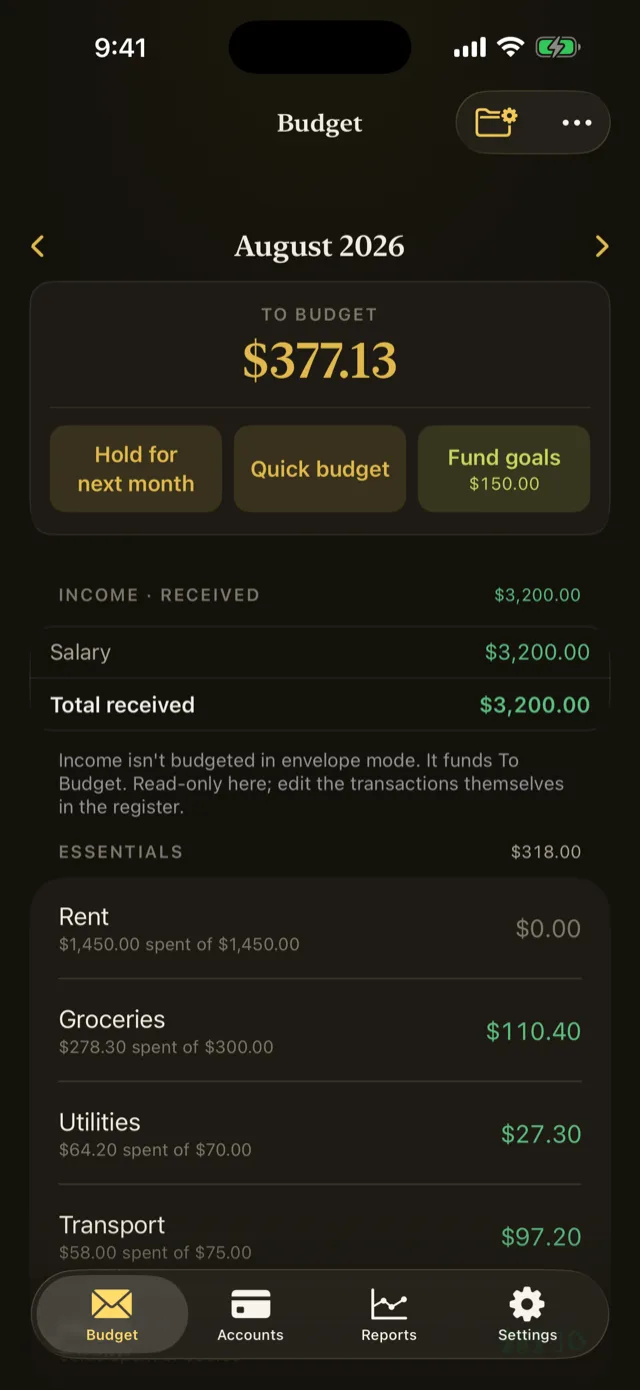
The header carries the month you are looking at and the state of your budget in it.
In envelope mode the large number is To Budget: money you hold that has no job yet. It is arithmetic, recomputed every time anything changes:
last month’s leftover, plus this month’s income, minus everything assigned this month.
When it is negative the label changes to Overbudgeted, meaning you have assigned money you do not hold.
The header also carries Quick budget, Fund goals, and Hold for next month.
In tracking mode the header shows Saved for past months and Projected Savings for the current and future ones. Refer to Envelope mode and tracking mode.
The envelope rows
Each row is one category, with three numbers:
| Column | What it is |
|---|---|
| Budgeted | What you assigned to this category this month |
| Activity | What you spent or received in this category this month |
| Available | What is left to spend, including anything carried from last month |
Available is the number that answers “can I buy this”. The other two explain how it got there.
Tap any row to open its actions: Assign, Move, Cover, and Quick.
What carries forward, and what does not
This is the part worth reading twice, because the two directions behave differently on purpose.
Money left over carries. An envelope you underspend keeps its balance. Leftover grocery money in March is grocery money in April, and an envelope you fund a twelfth at a time will hold the annual bill by the time it arrives.
Overspending does not carry, by default. Spend more than an envelope holds and next month that envelope resets to zero, while the amount you went over comes out of next month’s To Budget. The whole budget absorbs the overspend rather than one envelope carrying a debt.
The reasoning is that overspending is usually a decision about the budget as a whole, not about that one category. You did not really overspend on groceries; you spent money that some other envelope now cannot have.
A category can carry its own debt instead. Turn on Carries debt for a category and a negative balance stays on that envelope until you pay it back. Refer to Carry overspending in a category.
Either way, nothing changes until next month. The month you are looking at keeps exactly the numbers you see.
Income, and why you never budget it
Income categories are not envelopes. You do not assign money to them; money received in them funds To Budget, and you assign it from there.
That is the difference between an envelope budget and a plan. Income is not a promise about the future, it is money that has arrived and now needs a job.
You can set part of To Budget aside so it cannot be assigned this month, with Hold for next month. Refer to Hold money for next month.
Budgeting ahead
You can budget up to twelve months ahead. Future assignments reduce those months’ To Budget through the same arithmetic, and the current month’s header notes when money is already waiting in future months.
Something wrong or missing on this page? Write to supportpentosbudget.com.